In order to appear in search results on Google and other search engines, you need have an effective SEO strategy that consists of value driven content that is information rich, that uses keywords appropriately, in context and in the right places on your website.
When you do this, you tell Google and other search engines that your page is relevant to the keywords or keyword phrases that people are searching for and you'll start ranking and attract more website traffic.
As Google is the biggest search engine, this article is specifically related to Googles' search engine.
SEO stands for Search Engine Optimization. Search Engine Optimization (SEO) is the process of optimizing a website to try and achieve higher rankings in search results on search engines.
Ranking on Google, or any other search engine, means more traffic to your site, more visibility in search results and the potential for more sales. While people may find you because they have your website address, if you don't rank, people won't find you when searching your niche online and you'll be loosing out on website traffic.
SEO has become extremely complex and this guide serves to give you the fundamentals in getting your website optimized. Once you’ve got these in place, you can investigate more advanced SEO strategies and learn more about how to use Googles analytics tools to increase your website rankings.
The point of keyword planning is that by using the right keywords in the correct way, you will start ranking on search engines and start driving traffic to your website.
This is critical when developing your content - from website page content, to your blog content, in your content marketing strategy as well as your social media marketing strategy. It’s really about understanding what your potential clients are actually searching for in your niche and strategically using specific keywords in your website and content in order to let Google know that your website has information relating to those keywords.
The best way to start planning your keywords, is to start using Google Ads' free Keyword Planner, where you can start generating keywords. If you haven't already created a business Google account, do so at https://accounts.google.com.
Sign into Google Ads with your business account details to start researching your keywords. It will open with a “New Campaign” – this is when you will start advertising and driving traffic to your website. Select the “Switch to Expert Mode” at the bottom of the page.
Follow the prompts until you get the page where you can start exploring your account and click on "Tools & Settings".
Then select “Keyword Planner” under “Planning”.
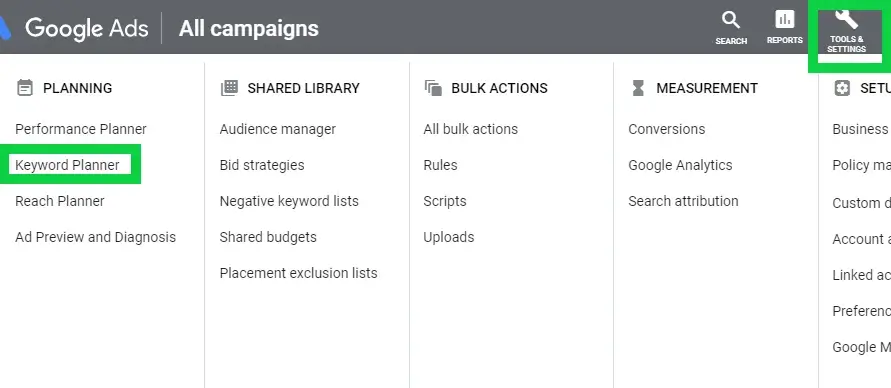
Select “Discover New Keywords” to start your keyword planning process.
Start inputting words and long-tail keyword phrases (three to four-word phrases), that you think your Perfect Client would search to find your services/products as well as what words you would use to describe your offering.
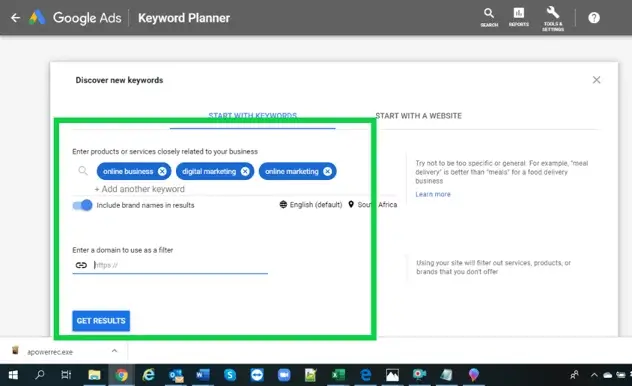
Once you’ve clicked on “Get Results”, you'll be taken to a results page where you can fine tune your results with filters.
Once you’ve clicked on “Get Results”, you'll be taken to a results page where you can fine tune your results with filters.
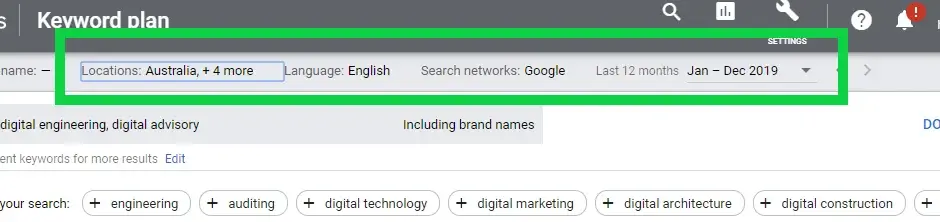
Google will give you the average monthly search for specific words and phrases that people are searching and how much competition there is for that keyword. This will give you an idea of how many searches and variants of those searches are done so that you can get an idea of demand.
You want to look for keywords that people are actually looking for that don’t have a ton of competition. When you use low competition (aka low difficulty) keywords and long-tail keyword phrases, you have a higher chance of ranking when you use these keywords in the right places in your website and content.
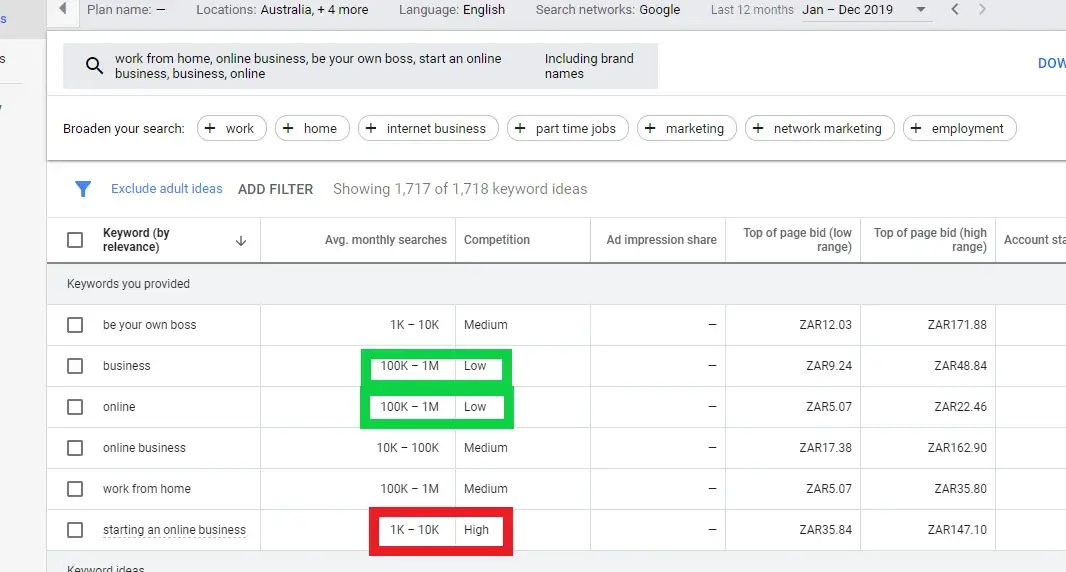
List the primary keywords that are relevant to your business and include them in long-tail phrases – this a is a three to four-word phrase that includes your keywords.
You can generate keyword phrases by mixing up the keywords using a free tool like KeywordIn. Another great free tool for keyword planning is Soovle. It provides autocomplete suggestions from not just Google, but from other search engines and resources too, including Yahoo, Bing, YouTube, Wikipedia and Amazon.
You will then use these keywords and long-tail keyword phrases in your website content as well as other content you share on the web, which will improve your SEO rankings. Here’s an example:
If “digital engineering” is your primary keyword, create long-tail keyword phrases like “a guide to digital engineering”, “digital engineering and advisory services”, “digital electrical engineering” and other phrases that include “digital engineering”.
Page titles are the most important place to make sure you include your keyword phrase as it’s a crucial on-site search engine ranking element and you want the page title to match the page URL.
Page titles tells search engines what your page is about. Web crawlers, or spiders, are used to update web content or list the content of other websites so users can search more efficiently. They look for content, headlines and links. When Google crawls your website to figure out what each page is about, one of the first things it does, is look at the URL to see what the topic of the page is.
Most web browsers will display the web page title at the top of the browser window and/or in the browser tab.
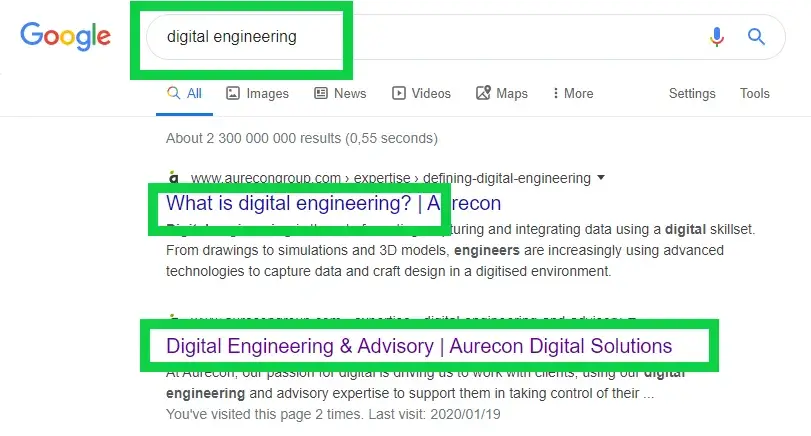
You can display up to 70 characters in your page title so don’t keep it too short (or too long) – take advantage of using keyword phrases in your page titles.
You don’t have to include your company or website name in a page title and if you do, position it at the end of the page title and use your keyword phrase in the beginning of a title. It’s easier to read and will capture more attention than your company name would if you place your keyword phrase at the end of the page title.
If you need more characters for your page title – rather have a strong page title and leave out the company name.
Users want information quickly and therefore you want to make sure your page tile is easy to understand and makes the user want to open your page.
Avoid putting too many keywords and keyword phrases in a page title.
Make sure each web page has its own page title.
If you don’t get the page title right, it will appear as “Untitled Document” and waste an SEO opportunity.
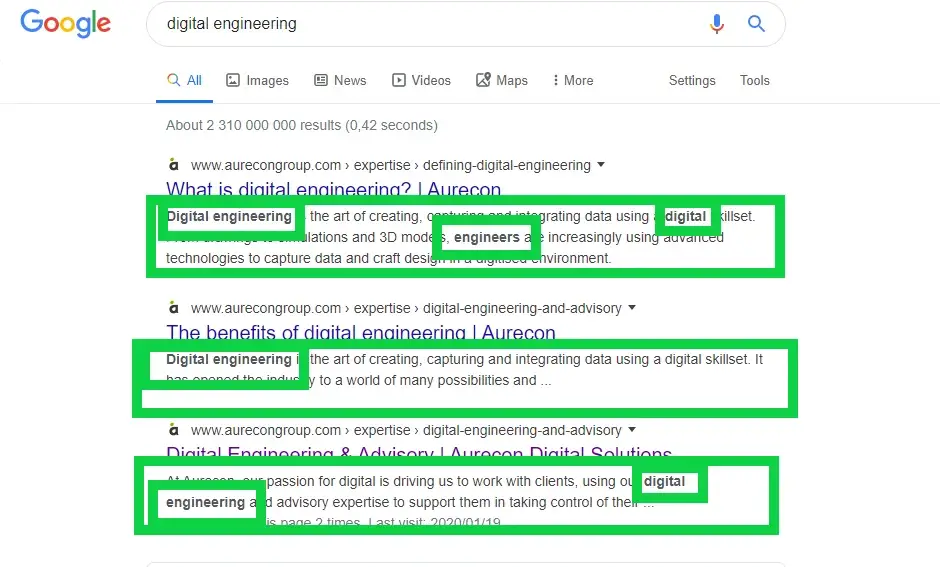
The meta description is the text that Google displays beneath your page title in the search engine to give users an idea of what the page is about.
The H1 or main header tag containing your keywords should only appear once and at the top of the website page.
Google considers all header tags, so use header tags to make sub-headers for your paragraphs by including H2, H3, H4, H5 and H6 tags. Include your keyword phrases and variants of your keyword phrases to optimize headers. Apart from optimizing your SEO, you also break your content up into pieces that makes it easier for your audience to consume.

Internal linking means linking to other pages within your website. Internal linking is important for SEO because it shows Google what and how your content is related, and the value of that content. Because Google deems a page that gets a lot of valuable links as more important, you’ll increase the chance of that page ranking.
There are many advantages of internal linking:
- It helps establish site architecture by showing how your page is related to other pages on your website;
- You help navigate your users experience on your site;
- It builds page views;
- It improves page ranking;
- It builds web page authority and
- It keeps people on your website for longer.
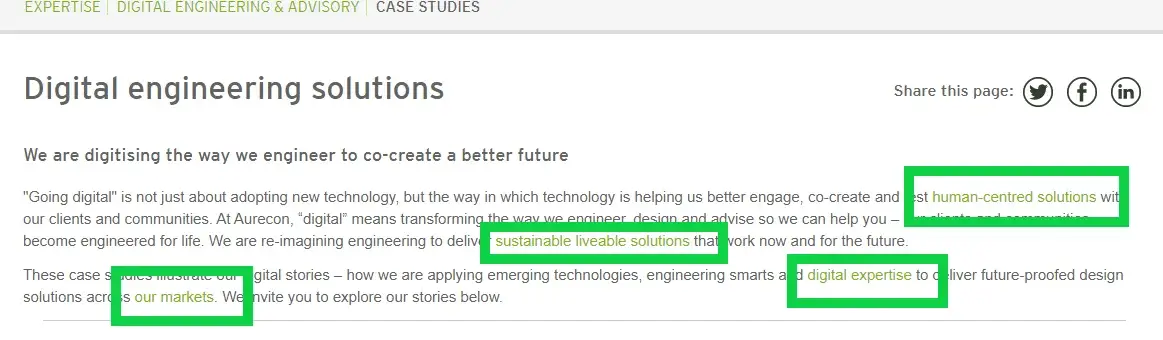
External links are links that link to other websites, either other websites linking to your website, or you linking your website to others. When you create content and link to other reputable sources outside of your website, you show search engines that you've done your research, thereby giving your website more authority and making it more trustworthy.
You want to have your links open in new tabs so that when someone clicks one of your external links, your page stays open. This means that your page stays open while they look at another page with a higher chance of them returning to it.
Google values user experience, and an easy way to improve user experience is to include images, videos, and GIFs in your posts. Try to aim to have an image for every 100-150 words on the page. Use your keywords, phrases and variants to name and describe your images and videos in the following places:
Alt tag – This is describing the actual image. The alt tag is really intended for people with sight impairment or who block images so provide keyword rich descriptions.
File name – make sure the actual file name of the image includes your keyword phrase.
SEO properties of the graphic file – If you have Photoshop or other graphic editing programs, you can actually edit the title, description and keyword meta tags in the file itself.
It can take anything between six and twelve months to start ranking on Google, depending on how many people are searching your domain name, have a high click through rate and how strong your user metrics are. That's why you want to make sure your website is set up for conversion. Due to competition and Google constantly updating its algorithm, it's a long-term process that will require continuous attention and patience.
While you monitor your analytics, watch your key metrics and improve them as early as you can. The key metrics you want to look out for are:
Time on site: 2-3 minutes is good.
Bounce rate (how many people leave after viewing just one page): 25%-65% is a good range.
The number of pages they click to: The higher the better.
SEO can get really complicated but my suggestion is to focus on what you have control over and do that well. Once you get your foundation right, you can then start working with your analytics to tweak and adjust.
SEO is a long term game. It can take anything between six and twelve months to start ranking on Google, depending on how many people are searching your domain name, have a high click through rate and how strong your user metrics are. That's why you want to make sure your website is set up for conversion. Due to competition and Google constantly updating its algorithm, it's a long-term process that will require continuous attention and patience.
While you monitor your analytics, watch your key metrics and improve them as early as you can. The key metrics you want to look out for are:
Time on site: 2-3 minutes is good.
Bounce rate (how many people leave after viewing just one page): 25%-65% is a good range.
The number of pages they click to: The higher the better.
SEO can get really complicated but my suggestion is to focus on what you have control over and do that well. Once you get your foundation right, you can then start working with your analytics to tweak and adjust.
Regardless of what stage you're at on your online journey, Mangools hosts five SEO tools in one place!
Generate keywords and long-tail keyword phrases to use in your content strategy, understand what keywords your competitors are using, track your rankings, analyze your backlinks and get valuable site metrics and insights that will help you optimize your site.
Here's what I love about Mangools:
 Super user friendly. Mangools is easy to use
and requires no technical skill.
Discover and analyze keywords and long-tail keyword
phrases.
Mangools keyword planning tool allows you to generate
keywords, analyze and list low competion keywords to use in
your content strategy.
Get related keyword ideas, learn your competitors keywords and
track your keywords to
optimize your SEO.
Understand your SEO metrics and insights to
make adjustments as you go.
Learn everything SEO in one place with
Mangools SEOpedia and blog.
Start using all of the Mangools SEO tools with a no
obligation
10-day free trial.
Save money with a 40% discount on all annual
plans.
No binding contracts. Upgrade, downgrade, or
cancel your subscription any time.
Super user friendly. Mangools is easy to use
and requires no technical skill.
Discover and analyze keywords and long-tail keyword
phrases.
Mangools keyword planning tool allows you to generate
keywords, analyze and list low competion keywords to use in
your content strategy.
Get related keyword ideas, learn your competitors keywords and
track your keywords to
optimize your SEO.
Understand your SEO metrics and insights to
make adjustments as you go.
Learn everything SEO in one place with
Mangools SEOpedia and blog.
Start using all of the Mangools SEO tools with a no
obligation
10-day free trial.
Save money with a 40% discount on all annual
plans.
No binding contracts. Upgrade, downgrade, or
cancel your subscription any time.
Regardless of what stage you're at on your online journey, Mangools hosts five SEO tools in one place!
Generate keywords and long-tail keyword phrases to use in your content strategy, understand what keywords your competitors are using, track your rankings, analyze your backlinks and get valuable site metrics and insights that will help you optimize your site.
Here's what I love about Mangools:
Super user friendly. Mangools is easy to use
and requires no technical skill.
Discover and analyze keywords and long-tail keyword
phrases.
Mangools keyword planning tool allows you to generate keywords,
analyze and list low competion keywords to use in your content
strategy.
Get related keyword ideas, learn your competitors keywords and
track your keywords to optimize your SEO.
Understand your SEO metrics and insights to
make adjustments as you go.
Learn everything SEO in one place with Mangools
SEOpedia and blog.
Start using all of the Mangools SEO tools with a no obligation
10-day free trial.
Save money with a 40% discount on all annual
plans.
No binding contracts. Upgrade, downgrade, or
cancel your subscription any time.
